If you have ever passed on a +EV play because the number "felt stale," or taken one because the line was still moving your way, you already understand why timing matters as much as edge. SharpMoney's Plus EV indicators put that context on every row: small icons beside the price, 1H and Open percentages when you expand, and Sharp Money Gold Cards when several signals line up at once.
This guide walks through what each icon means, how to read them on the live feed, and how they fit a normal +EV workflow. Definitions match the in-app Indicator Guide on Pro and Alpha.
Who gets indicators: Pro and Alpha only. Core includes the +EV feed without this layer. Compare plans or start a Whop trial when offered.
Plus EV Indicators at a Glance
- On the feed — up to three icons next to the sportsbook odds (limit move, last-hour fair value move, value vs. open).
- In expanded view — numeric 1H and Open % next to EV and fair value.
- Gold Card — amber highlight when price and limit action strongly confirm the +EV side (game markets only; not player props).
- Indicator Guide — tap the button on the +EV page for the full legend anytime.
Reading the +EV Feed (With Icons)
Each row is still a standard +EV alert: EV%, recommended risk units, matchup, market, book, and Bet. Indicators sit between the book logo and the odds, so you can scan movement without opening charts on every play.
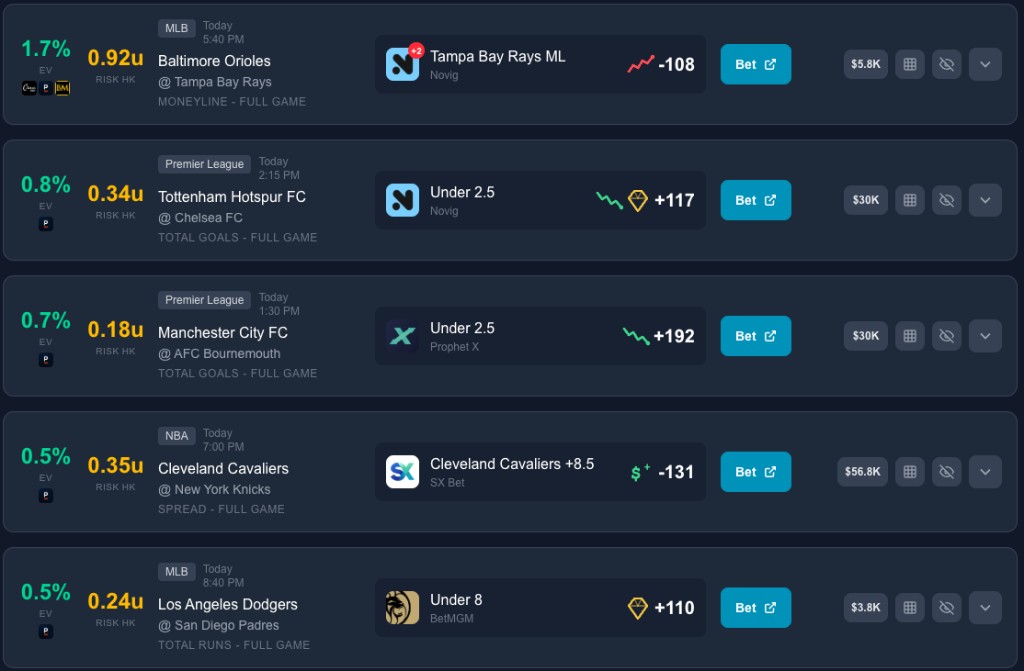
Left to right on a typical row:
- EV % and risk units (Kelly-style sizing for your bankroll settings)
- League badge, start time, teams, and market (e.g. moneyline, total)
- Sportsbook, indicator icons, then odds and Bet
- Limit / liquidity on the right when Pinnacle data is available
Icons only render when there is enough history to compute a move. No icons does not mean "bad play" — it often means the market has been quiet in the last hour.
Indicator Guide (In-App Legend)
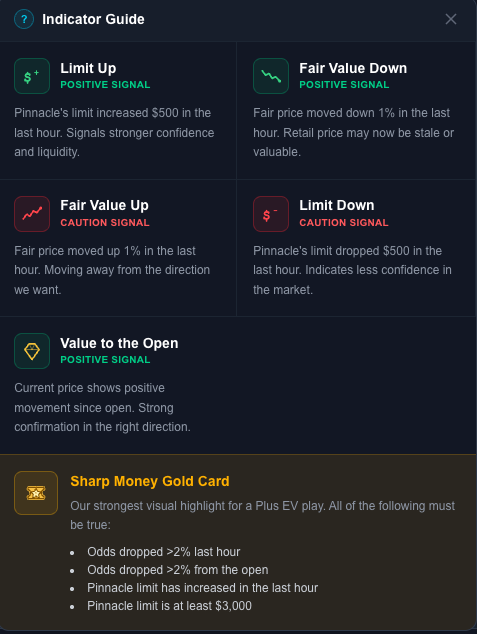
Open Indicator Guide from the +EV screen. It groups signals into positive, caution, and Gold Card rules. The sections below mirror that modal.
Icon-by-Icon Reference
On the feed, icons appear in this order when multiple signals fire: limit, then last hour, then vs. open.
| Signal | What it tracks | Typical read |
|---|---|---|
| Limit Up | Pinnacle limit rose $500+ in the last hour | Books willing to take more volume on this market |
| Limit Down | Pinnacle limit fell $500+ in the last hour | Caution — less confidence or liquidity pulled back |
| Fair Value Down | Fair price moved down 1%+ in the last hour | Market moving toward your side recently |
| Fair Value Up | Fair price moved up 1%+ in the last hour | Caution — edge may be shrinking |
| Value to the Open | Fair value is favorable vs. the opening reference on that market | Confirmation the move is not only a one-hour blip |
Fair value comes from SharpMoney's sharp-book devig (Pinnacle, BookMaker, Circa), or your custom devig settings on Pro+. Indicators follow the same fair value you see on the card.
Positive Signals
These are the "green light" icons in the Indicator Guide. They do not replace EV math, but they answer: is sharp money still on my side?
- Limit Up — Pinnacle raised limits by at least $500 within the last hour. Often pairs with sharp action hammering a side once more limit is available (see our line movement guide for the limits-up / odds-down pattern).
- Fair Value Down — fair price on your side moved down 1% or more in the last hour. On a +EV bet, that usually means the market is adjusting toward you.
- Value to the Open — you still have favorable value relative to where the market opened. Helps separate a fresh steam move from noise.
Caution Signals
Red-flag icons are not auto-fades. They mean: pause and look at the chart before you bet max units.
- Fair Value Up — fair price moved up 1% or more in the last hour. The book's view of fair may be drifting away from your bet.
- Limit Down — Pinnacle cut limits by $500+ in the last hour. Common when books are uncertain (injury news, weather, lineup chaos). Many bettors skip these entirely until limits stabilize.
Expanded View: 1H and Open %
Tap a row to expand it. Beside EV and fair value you will see:
- 1H — percent change in fair value vs. about one hour ago (same threshold family as the hour icon: moves under 1% may show as flat).
- Open — percent change vs. the opening reference for that market on the feed.
Color coding in expanded view makes direction obvious at a glance. Use icons when you are scrolling 50+ plays; use 1H / Open % when you are deciding bet size on a short list.
Sharp Money Gold Card
A Gold Card is the highest-confidence highlight on the feed: amber border, "Sharp Money Gold Card" label, and styling that stands out from normal rows. The Indicator Guide requires all of the following at once:
- Fair value / odds moved down more than 2% in the last hour
- Moved down more than 2% from the open
- Pinnacle limit increased in the last hour
- Current Pinnacle limit is at least $3,000 (spreads and run lines may use a higher minimum)
Gold Cards appear on game markets (moneylines, spreads, totals, etc.), not player props. Think of them as: sharp price move + limit confirmation + enough liquidity to matter.
They are still not locks. They are a fast filter for "everything we track is pointing the same way" so you spend chart time on the best candidates.
Example Scenarios
High EV, caution icons
A 3% EV play with Fair Value Up and Limit Down can still be +EV on paper, but the market may be telling you the number is dying. Many users pass or bet small until the chart confirms.
Modest EV, strong icons
A 0.8% EV row with Limit Up, Fair Value Down, and Value to the Open is exactly the kind of play line-movement bettors size up — the math is thin, the flow is not. That logic is the same reason our line movement strategy guide emphasizes charts over headline EV% alone.
Gold Card on a mid-tier EV%
When a play qualifies as a Gold Card, you are often looking at coordinated price and limit action. Pair it with your book filter and Kelly units, then open the movement chart if you want the full Pinnacle history.
Recommended +EV Workflow With Indicators
- Set filters — books, sports, min EV, markets (filter settings guide).
- Scan EV% and risk units — your usual first cut.
- Glance at icons — favor limit up + fair value down; be careful on fair value up or limit down.
- Expand finalists — compare 1H vs. Open % before sizing.
- Prioritize Gold Cards when you want the strictest confirmation.
- Open charts on anything you are betting meaningful units on.
New to +EV? Start with what is +EV betting and A Beginner's Guide to SharpMoney.
FAQ
Why don't I see any icons on a play?
Usually insufficient odds history in the last hour or no qualifying Pinnacle limit move ($500+). The bet can still be +EV.
Do indicators change my EV%?
No. EV% is computed from fair value vs. the retail price. Indicators describe movement around that snapshot.
Can Core users upgrade mid-cycle?
Yes via Whop — move to Pro or Alpha to unlock indicators on the live feed.
Does Alpha get more indicators than Pro?
The indicator layer is the same on Pro and Alpha. Alpha adds other tools (e.g. Signal, Odds Screen) per plan.
Key Takeaways
- Indicators show limit and fair value movement on each +EV row, plus 1H / Open % when expanded.
- Positive: Limit Up, Fair Value Down, Value to the Open.
- Caution: Fair Value Up, Limit Down.
- Gold Cards bundle strong hour + open moves with a Pinnacle limit increase and $3K+ limit (game markets).
- Available on Pro and Alpha only — open Indicator Guide in the app for the live legend.
Plans: SharpMoney pricing · Pro on Whop · Alpha on Whop. Confirm trial and promo terms at checkout.